 QubeSurvey
Tickets and proposed fixes
Tickets connect a reported problem to its script version, description and available test evidence. Filing from a running test captures its recorded interview history. Source-load failures and general tickets may have no replayable journey, so include the expected behavior and relevant conditions.
For the primary path, install the QubeSurvey extension, write and test locally, upload a version for teammate review, activate an open-link Run, then download the data. See the four-step survey guide for details.
Describe and discuss
Use a short, specific title. In the description, separate what happens now from what should happen. Comments support Markdown: paragraphs, lists, emphasis, links and fenced code blocks. Raw HTML is not executed.
Request a ticket fix from the Assistant
The hosted ticket assistant is optional; availability depends on beta access. An authorized Script editor can request work when enabled and when the linked Account has the required permissions and prepaid balance. Script roles control project access, while Account roles control billing. Account billing access does not grant access to a private Script or its participant data.
Open an eligible, open script ticket and choose Prepare a fix. It opens the Assistant queue with that ticket selected. Check the selection and maximum cost before Start Assistant. Assignment alone does not start work. Use Back to tickets to return to the same report. A run’s Open ticket controls lead to its reports, including tickets with a proposed fix.
The Assistant investigates and may prepare a new script version for review. It does not silently promote that version or approve its own work. Read the handoff comment and inspect the linked version; a status message alone is not evidence that the problem is fixed.
If a run fails or produces no reviewable version, the ticket still needs human attention. Keep the report open and use the visible run information when investigating or requesting another attempt.
Understand the outcome
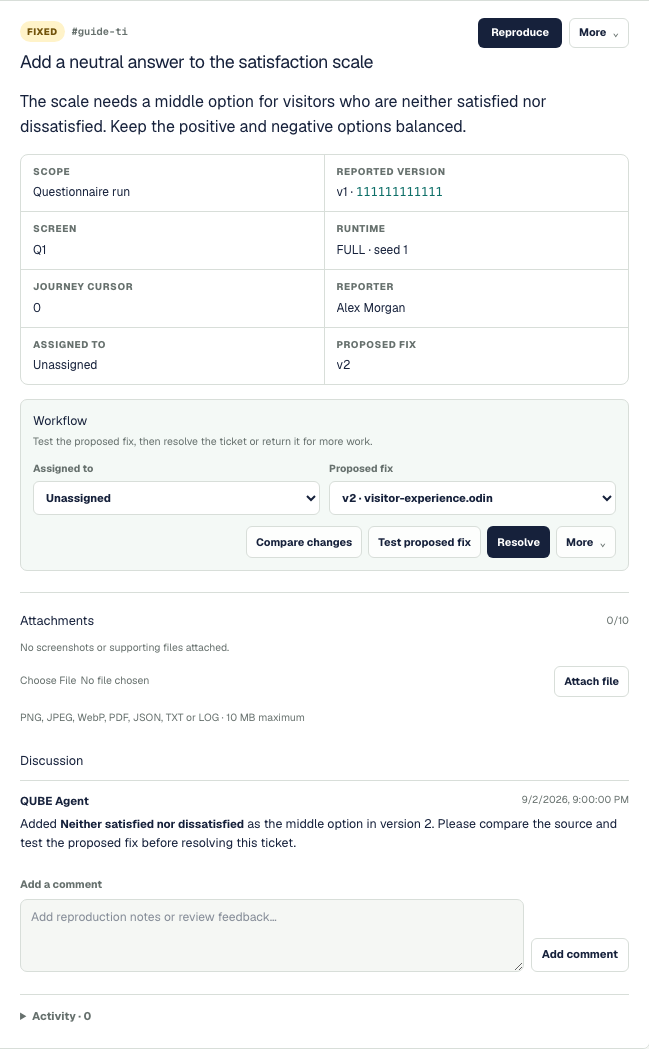
The report stays alongside its proposed fix. Start with Compare changes and Test proposed fix; use Resolve only after checking the result. The discussion records what was changed and what still needs your attention.
Fixed means an implementation is ready for a human to check. It does not mean that review is complete. Resolved means a human has verified the result and closed the ticket. Reopen it when the problem remains or returns.
Compare the candidate’s source with the reported version. Replay available history, then test the affected and nearby routes, including corrections with Back, before using the version or resolving the ticket. Odin and QubeScript browser tests support saved test journeys tied to the tested version. See Testing a script.
flowchart TD
  report[Open ticket] --> work[Human or assistant investigates]
  work -->|No proposed fix| followup[Record findings; ticket stays open]
  work -->|New version prepared| fixed[Fixed: ready for review]
  fixed --> check[Human compares and tests]
  check -->|Verified| resolved[Resolved]
  check -->|Still wrong| reopen[Reopen with feedback]
  reopen --> work
Every assistant attempt should leave a human-readable follow-up. Only a human decides that the tested result is satisfactory.